

What is FlowJoe?
FlowJoe is a local-first, desktop-first workspace built around hierarchical trees called Flows. Each node is a living container: notes, status, theming, and a rich media gallery of images, audio, video, documents, spreadsheets, calendars, URLs, and embeds — with an AI collaborator (Joe) who can see context you allow and propose changes you approve. It is for people doing serious creative, research, or professional work that is branching, relational, visual, and reference-heavy. In FlowJoe the tree is not just an organizer. It is the primary surface for thinking.FlowJoe is not a public HTTP API product. These docs are shaped like modern product documentation — overview, concepts, surfaces, guides, and reference — so you can learn how the app works.
The three first-class ideas
At its heart, FlowJoe is built around three first-class citizens:
Structure and visual reference material are designed to coexist without one constantly trying to dominate the other.
The two hemispheres
One useful way to think about the interface — and about these docs:Structure (left)
The tree is order, hierarchy, and place — where everything belongs. Roots, nodes, parents, children, siblings.
References (right)
The gallery is association and seeing many things side-by-side. Media, stacks, tags, workbenches.

The live application layout
Here is how these hemispheres map to the actual FlowJoe application interface: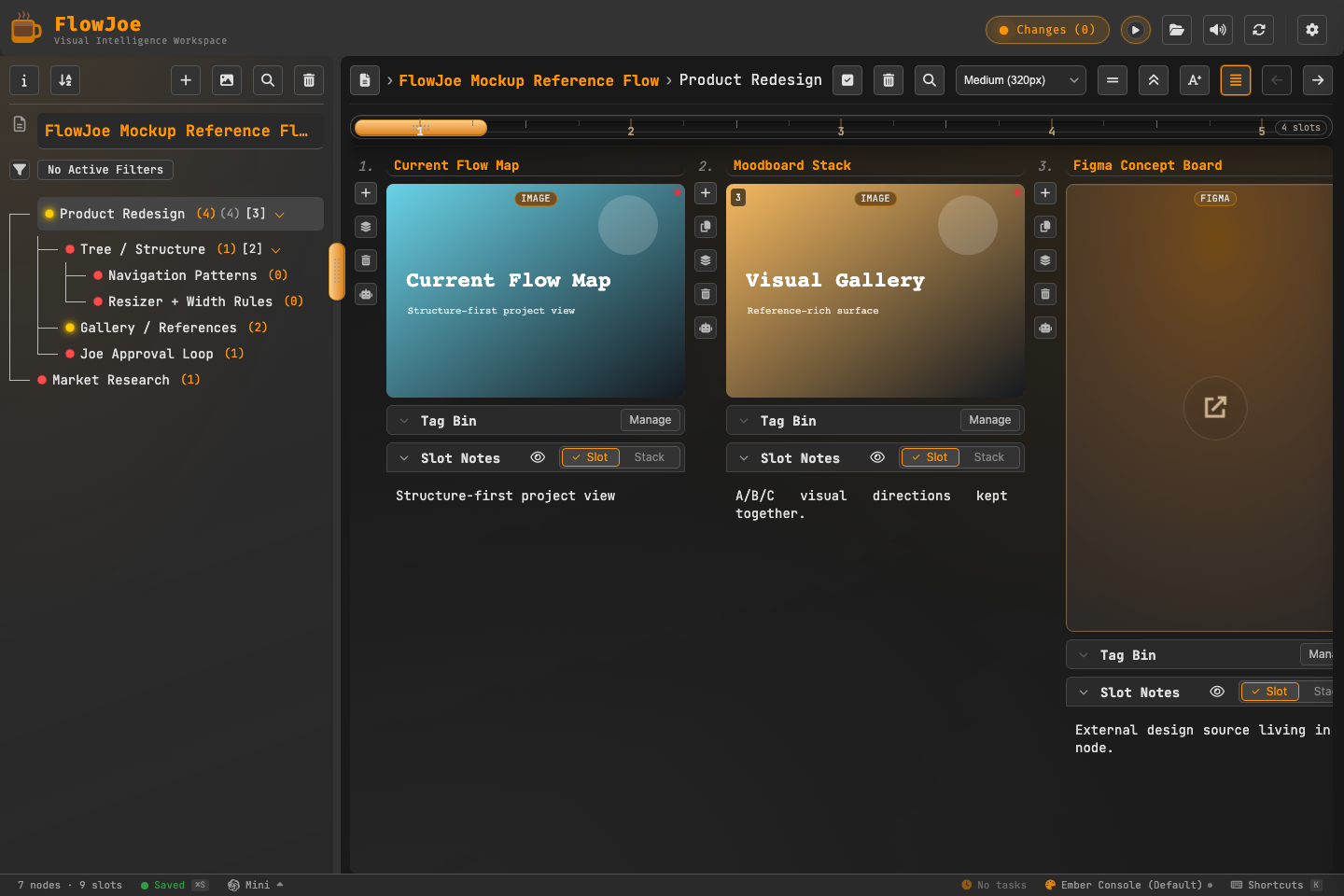 Many tools force everything into one mode. FlowJoe gives you two strong hemispheres and a direct way to balance them.
Design principles (in plain terms)
Local-first with transparency
Local-first with transparency
Your data lives on your machine. Storage usage is visible and cleanable.
References are not second-class
References are not second-class
Media, documents, and URLs are meant to be lived inside of, not just attached.
Discovery views stay honest
Discovery views stay honest
Tag queries and all-node search produce virtual galleries you can explore without accidentally rewriting structure.
AI is a collaborator, not the owner
AI is a collaborator, not the owner
Joe proposes; you approve. He never silently rewrites your tree.
Scoped safety
Scoped safety
Undo and history stay local enough that deep work in one area does not create chaos everywhere else.
Honest limitations
Honest limitations
When something is intentionally not supported, the product (and these docs) say so.
Who these docs are for
- You opened FlowJoe (or are about to) and want a clear map of how the app works
- You want task paths (“import a folder”, “hand Joe a branch”) without reading engineering contracts
- You need lookup tables (shortcuts, file types, settings) later
docs/REFERENCE/ in the repo. Those remain the source of truth when behavior is ambiguous.
Where to go next
Core mental model
Install the three ideas: structure, references, meaning.
Quick start
First ten minutes: nodes, media, optional chat with Joe.
Global Audio Player
Persistent playback, tags, and saved playlists.
Plugins & Verticals
Explore the plugin framework roadmap and target domains.
Plugin Architecture
Manifest contracts, schemas, extension fields, and templates.
Ways to Use FlowJoe
Practical creative and professional use cases.
Tree anatomy
Roots, nodes, parents, children, siblings.
Gallery anatomy
Slots, stacks, and how media lives on a node.
Joe
The trust model: propose → you approve.